• Debian 11 is approaching its end-of-life (vendor EOL date - August 31, 2026). Plesk Obsidian 18.0.80 will be the last release to support it.
    If you are running Plesk Obsidian on Debian 11, we recommend you upgrade those servers to Debian 12 using our dist-upgrade tool.
  • We plan to deprecate and remove the support for XML RPC protocol versions earlier than 1.6.9.1 in Plesk Obsidian 18.0.82. We strongly recommend that you update all existing integrations using earlier versions of the XML RPC protocol to comply with the version 1.6.9.1 specification.

Resolved Change the ip of a subscription

Cordal

Basic Pleskian
I have migrated from plesk 12.5 to plesk Onix, and now I can not find where to change the ip to a subscription, in Plask 12.5 I did it from the side menu in the option to change the hosting configuration but in plesk Onix I can not find this option.
 
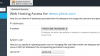
Have you tried to click "Web Hosting Access" menu and change IP address there?
 
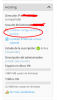
Thanks for your reply in plesk 12.5 I did it from the option that I show you in the capture,

25.png

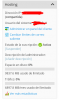
but as you will see in plesk Onyx that option has disappeared

26.png
 
Domains > example.com > Websites & Domains tab > Web Hosting Access and choose from the drop-down list of all available IP addresses on a server.
 
Back
Top