• The APS Catalog has been deprecated and removed from all Plesk Obsidian versions.
    Applications already installed from the APS Catalog will continue working. However, Plesk will no longer provide support for APS applications.
  • Please be aware: with the Plesk Obsidian 18.0.78 release, the support for the ngx_pagespeed.so module will be deprecated and removed from the sw-nginx package.

Resolved Change the ip of a subscription

Cordal

Basic Pleskian
I have migrated from plesk 12.5 to plesk Onix, and now I can not find where to change the ip to a subscription, in Plask 12.5 I did it from the side menu in the option to change the hosting configuration but in plesk Onix I can not find this option.
 
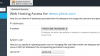
Have you tried to click "Web Hosting Access" menu and change IP address there?
 
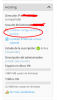
Thanks for your reply in plesk 12.5 I did it from the option that I show you in the capture,

25.png

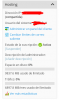
but as you will see in plesk Onyx that option has disappeared

26.png
 
Domains > example.com > Websites & Domains tab > Web Hosting Access and choose from the drop-down list of all available IP addresses on a server.
 
Back
Top