
 Facebook
 Twitter
julianlbch
New Pleskian
- Server operating system version
- CentOS 7.9
- Plesk version and microupdate number
- Version 18.0.63 Update #2
I used Plesk Migrator to migrate a complete Subscription from Server A to Server B.
On Server A the Email Settings on Domain looks like this:
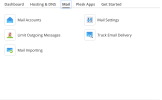
and on Server B it looks like this:
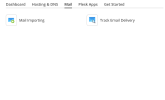
The Mail Service however works without any issue and i can access the Mails via Webmail and IMAP.
I also restarted the Server without any issue and cannot see anything in the Log Files.
Best regards,
Julian
On Server A the Email Settings on Domain looks like this:
and on Server B it looks like this:
The Mail Service however works without any issue and i can access the Mails via Webmail and IMAP.
I also restarted the Server without any issue and cannot see anything in the Log Files.
Best regards,
Julian


