Facebook
 Twitter
EnriqueR
Regular Pleskian
- Server operating system version
- Ubuntu 20.04.5
- Plesk version and microupdate number
- Plesk Obsidian Version 18.0.46 Update 2
I have a server running CentOS 6.10 Plesk Obsidian Version 18.0.31 Update 3. I want to migrate all subscriptions to another Server running Ubuntu 20.04.5 Plesk Obsidian Version 18.0.46 Update 2.
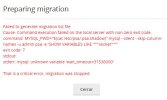
The problem is that when I give new migration, when trying to connect to the CentOS server, I get the following error:
I have added the 'wait_timeout' tag to the my.cnf file (because it didn't exist), but it still gives me the same error. Can you help me to know the reason for this error?
The problem is that when I give new migration, when trying to connect to the CentOS server, I get the following error:
Failed to generate migration list file
Cause: Command execution failed on the local server with non-zero exit code.
command: MYSQL_PWD="$(cat /etc/psa/.psa.shadow)" mysql --silent --skip-column-names -u admin psa -e 'SHOW VARIABLES LIKE '"'"'socket'"'"''
exit code: 7
stdout:
stderr: mysql: unknown variable 'wait_timeout=31536000'
That is a critical error, migration was stopped.
I have added the 'wait_timeout' tag to the my.cnf file (because it didn't exist), but it still gives me the same error. Can you help me to know the reason for this error?