• Halloween is coming! To celebrate the occasion, we dusted off a couple of old skins, and even created a brand new one (Pixel).
    To get into the festive spirit, install the Skins extension.
  • The new Python extension is now available. It allows customers to deploy and manage WSGI-based Python applications on their websites directly from Plesk.
  • The Plesk Mobile apps for iOS and Android and the Plesk Mobile Center extension have been deprecated, and are no longer available for new installations. In Plesk Obsidian 18.0.84, the Plesk Mobile Center extension will be removed from servers during the upgrade, and the Plesk Mobile apps will lose their server management features.
  • The Social Login extension has been deprecated and will be removed in Plesk Obsidian 18.0.84. After that, it will no longer be possible to log in to Plesk with a Google, Facebook, GitHub account, or with a passkey. Plesk usernames and passwords, as well as logging in with a WebPros Account, are not affected.

Issue Error on creating plesk backup: Unable to make database dump. Exit code: 5

dagclaessens

New Pleskian
We run a backup of the server every night. The server has multiple databases (250+). All databases are backed up without issues, only 2 of them give this exact error:
Unable to make database dump. Error: Failed to exec mysqldump: Exit code: 5:

When I search for this error, this mostly occurs when the server does not have enough disk space. I am certain the server has enough disk space. I even increased the disk space (virtual server) to be sure. While these are the 2 biggest databases on the server, they are not really big (1.5 - 2GB).
Can anyone help me with this issue? Thank you in advance!
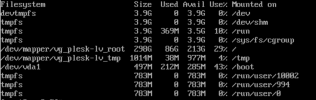
 
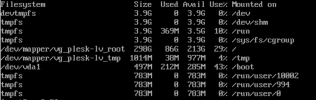
I think I might found where the problem is. Plesk uses the DUMP_TMP_D variable for creating the dump. It is now on the /tmp partition.
Is it save to change this (DUMP_TMP_D) to a new directory on the main partition? (For example /var/tmp/pleskbackup).
The current values are:
DUMP_D /var/lib/psa/dumps
DUMP_TMP_D /tmp
This is the free disk space to make it all clear:
1646079770945.png
 

Attachments

  • 1646079767834.png
    1646079767834.png
    64.5 KB · Views: 0
Hi Peter,
Thanks for your quick response. Your link is for changing the DUMP_D value, but this value is (I think) correct, because /var is linked to the root. The issue is in the DUMP_TMP_D value, because this one is linked to the small /tmp partition. Do I need to follow these steps from your link as well or can I juste change the DUMP_TMP_D value?
 
Back
Top