• Debian 11 is approaching its end-of-life (vendor EOL date - August 31, 2026). Plesk Obsidian 18.0.80 will be the last release to support it.
    If you are running Plesk Obsidian on Debian 11, we recommend you upgrade those servers to Debian 12 using our dist-upgrade tool.
  • We plan to deprecate and remove the support for XML RPC protocol versions earlier than 1.6.9.1 in Plesk Obsidian 18.0.82. We strongly recommend that you update all existing integrations using earlier versions of the XML RPC protocol to comply with the version 1.6.9.1 specification.

Issue FPTS remote backups fails after 18.0.80 upgrade

treenet

New Pleskian
Server operating system version
ubuntu 22.04
Plesk version and microupdate number
18.0.80 #1
Hello everybody,

i'm looking for some help to solve this problem as i'm currently out of ideas...

Thank you!


Scenario:

Plesk Obsidian 18.0.80 update 1 (Plesk Obsidian v18.0.80_build1800260804.15 os_Ubuntu 22.04)

Ubuntu 22.04.5 LTS
Remote backups settings in plesk:
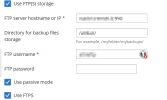
1786227858765.png


Remote FTPS server: Filezilla server 1.12.5

1786227888436.png

Remote FTPS user settings:
1786227908943.png

Problem: FTPS backups to external FTPS server fail with the following error:

Code:
Error: Unable to access the storage: Transport error: unable to list directory: Curl error: (56) Failure when receiving data from the peer: The last FTP request: LIST: The last FTP response: 150 Starting data transfer
Make sure you have entered the correct storage settings. You can check them independently with the command:
# curl -v --ftp-pasv --ssl -k -u [REDACTED] 'ftp://[REDACTED]:990//[REDACTED]//'


Command issued:

Code:
# curl -v --ftp-pasv --ssl -k -u [REDACTED] 'ftp://[REDACTED]:990//[REDACTED]//'
Enter host password for user '[REDACTED]':
* Trying [REDACTED]:990...
* Connected to [REDACTED] (XXX.XXX.XXX.XXX) port 990 (#0)
* server response timeout
* Closing connection 0
curl: (28) server response timeout


FTP server Response:

425 Unable to build data connection: TLS session of data connection not resumed.
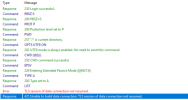
1786228107151.png


Investigation:
Today, before upgrading plesk to 18.0.80 update 1, FTPS backups were working and plesk was on version 18.0.79 update 5.

Updating filezilla server to 1.12.6 didn't help.

Renewing certificate didn't help.

Switching to explicit ftp didn't help.

Changing/adding parameters on panel.ini and proftpd.conf as suggested on other posts didn't help. (Ref. BUG Plesk 18.0.77 - FTP backups no longer work )


BUT

changing curl command from ftp to ftps
Code:
# curl -v --ftp-pasv --ssl -k -u [REDACTED] 'ftps://[REDACTED]:990//[REDACTED]//'

works and gives the correct output from ftps server.

So i think that plesk updates involve changes to Curl and ssl packages and the commands should be issued differently by plesk.


Workaround:

Disabling FTPS and switching to unsecure FTP enables remote backups again.
 
The same problem happened today after a manual update to v. 18.0.80 on another server, but on Windows 2022...

Error:
Code:
Warning: Could not display the list of backups in the FTP Storage: Unable to get ftp dumps list: FTP network error: Transport error: unable to list directory: Curl error: (56) Failure when receiving data from the peer: The last FTP request: LIST: The last FTP response: 150 Starting data transfer. Please check the FTP storage settings.
Code:
Warning: Unable to access the storage: Transport error: unable to list directory: Curl error: (19) FTP: could not retrieve (RETR failed) the specified file: The last FTP request: LIST: The last FTP response: 425 Unable to build data connection: TLS session of data connection not resumed
Make sure you have entered the correct storage settings. You can check them independently with the command:
curl -v --ftp-pasv --ssl -k -u [REDACTED] ftp://[REDACTED]:990//[REDACTED]/
 

UPDATE – Regression isolated to pmm-ras / plesk-backup-utilities 18.0.80​

I have performed further troubleshooting and I believe the issue can now be considered a reproducible regression in the Plesk Backup Manager FTPS transport.

Current environment

  • Plesk Obsidian 18.0.80 Update 3
  • Ubuntu 22.04.5 LTS
  • plesk-backup-utilities: 18.0-v.ubuntu.22.04+p18.0.80.3+t260813.2046
  • Remote server: FileZilla Server 1.12.6
  • FTPS implicit on TCP/990
  • Passive mode enabled
The same remote FTPS storage was working correctly with Plesk 18.0.79 Update 5.


1. The FTPS server itself works correctly​

From the same Ubuntu/Plesk server, the system curl can connect to exactly the same FileZilla server using implicit FTPS:

Code:
curl -vk --ftp-pasv \
  -u USER : PASSWORD \
  'ftps://FTPS-SERVER:990/REMOTE-DIRECTORY/'

System curl version:

curl 7.81.0
libcurl/7.81.0
OpenSSL/3.0.2

The connection succeeds, the directory is listed correctly and curl explicitly reports:

> EPSV
< 229 Entering Extended Passive Mode (...)

> LIST
< 150 Starting data transfer.

* Doing the SSL/TLS handshake on the data stream
* SSL re-using session ID

< 226 Operation successful

Therefore:

  • implicit FTPS on port 990 works;
  • the passive port range works;
  • firewall/NAT are working;
  • authentication works;
  • TLS works;
  • TLS session reuse on the FTP data connection works correctly with the same client host and same FileZilla server.

2. Plesk Backup Manager fails on the FTP data connection​

When Plesk tests the same remote storage, the FileZilla log shows:

USER ...
331 Please, specify the password.

PASS ****
230 Login successful.

PBSZ 0
200 PBSZ=0

PROT P
200 Protection level set to P

PWD
257 "/" is current directory.

CWD <remote directory>
250 CWD command successful

EPSV
229 Entering Extended Passive Mode (|||49163|)

TYPE A
200 Type set to A

LIST
150 Starting data transfer.

TLS session of data connection not resumed.

425 Unable to build data connection:
TLS session of data connection not resumed.

Plesk then reports:

Error: Unable to access the storage:
Transport error: unable to list directory:
Curl error: (19) FTP: could not retrieve (RETR failed) the specified file

The last FTP request: LIST
The last FTP response:
425 Use PORT, PASV or EPSV first

The 425 Use PORT, PASV or EPSV first message displayed by Plesk appears to be misleading, because the FileZilla server log clearly shows that EPSV was successfully issued and accepted before LIST.

The actual failure reported by FileZilla is:

TLS session of data connection not resumed.


3. Forcing TLS 1.2 does not solve the issue​

I also tested the documented Plesk setting:

Code:
[pmm]
ftpMaxTlsVersion = 12

The result is unchanged.

The FTPS control connection succeeds, but the data TLS connection still fails because its TLS session is not resumed.

Therefore this does not appear to be a TLS 1.3-specific issue.


4. pmm-ras contains an embedded/static libcurl implementation​

pmm-ras does not dynamically depend on the system libcurl.so.

For example:

Code:
readelf -d /usr/local/psa/admin/sbin/pmm-ras | grep NEEDED

shows dependencies including:

libssl.so.3
libcrypto.so.3
libboost_*_plesk.so.1.88.0
...

but no dynamic libcurl.so.

However, strings inside pmm-ras clearly contain libcurl code/messages, including:

This file was generated by libcurl!
A libcurl function was given a bad argument
An unknown option was passed in to libcurl
SSL_SESSION_free
SSL_set_session
SSL session not peer verified, not reusing
SSL: SSL_set_session not accepted, continuing without

This suggests that the FTP transport used by pmm-ras contains a statically linked/embedded libcurl implementation rather than using /usr/bin/curl and the system libcurl.

This would also explain why the system curl works correctly while Backup Manager fails on the same server.


5. Regression starts exactly between pmm-ras 18.0.79.5 and 18.0.80.0​

Fortunately, the previous Plesk backup utility packages were still available in the local APT cache.

I extracted the following packages without installing/downgrading them:

plesk-backup-utilities 18.0.79.5
plesk-backup-utilities 18.0.80.0
plesk-backup-utilities 18.0.80.2
plesk-backup-utilities 18.0.80.3

The corresponding pmm-ras binaries are:

18.0.79.5:
size 4,299,992 bytes
SHA256:
75c96b8eaf4f89db47b0f2f68d62a356cc906670da0745761ab47e6b3b3939b1

18.0.80.0:
size 4,320,600 bytes
SHA256:
acb6fc266f06cb508079ada6c029cbde06b9eff2319ca1b29940134100404e72

18.0.80.2:
size 4,320,600 bytes
SHA256:
acb6fc266f06cb508079ada6c029cbde06b9eff2319ca1b29940134100404e72

18.0.80.3:
size 4,320,600 bytes
SHA256:
acb6fc266f06cb508079ada6c029cbde06b9eff2319ca1b29940134100404e72

So:

  • pmm-ras changed between 18.0.79.5 and 18.0.80.0;
  • the pmm-ras binary in 18.0.80.0, 18.0.80.2 and 18.0.80.3 is bit-for-bit identical.
The dynamic dependencies of the 18.0.79.5 and 18.0.80.x binaries are also effectively the same, including OpenSSL 3 and the same Plesk Boost libraries.


6. A/B test confirms that the regression is in pmm-ras​

I then performed a controlled test.

The server remained fully updated to:

Plesk Obsidian 18.0.80 Update 3

with all 18.0.80.3 packages and libraries in place.

I backed up the current:

/opt/psa/admin/sbin/pmm-ras

and temporarily replaced only this binary with the pmm-ras extracted from:

plesk-backup-utilities 18.0.79.5

No other Plesk package, library, OpenSSL package, curl package, FileZilla configuration, firewall setting or remote storage setting was changed.

Result: FTPS remote storage immediately works again.

After restoring the original pmm-ras from Plesk 18.0.80.3:

FTPS fails again with TLS session of data connection not resumed.

The result can therefore be summarized as:

Plesk 18.0.80.3
+ pmm-ras 18.0.80.x
= FTPS FAIL

Plesk 18.0.80.3
+ pmm-ras 18.0.79.5
= FTPS WORKS

This appears to isolate the regression specifically to the changes made in pmm-ras between 18.0.79.5 and 18.0.80.0.


Expected behaviour​

When PROT P is enabled, pmm-ras should correctly reuse/resume the TLS session of the FTPS control connection when opening the passive FTP data connection, as the system libcurl does.

Expected result:

EPSV
LIST
150 Starting data transfer
TLS session resumed/reused on data channel
226 Operation successful

Actual behaviour since pmm-ras 18.0.80.0​

EPSV
LIST
150 Starting data transfer
TLS session of data connection not resumed
425 Unable to build data connection


Conclusion​

Based on the A/B test, I believe this is a regression in the FTPS implementation bundled with pmm-ras / plesk-backup-utilities 18.0.80.

Could the Plesk development team please check the changes made to the embedded libcurl / FTPS TLS session handling between:

plesk-backup-utilities 18.0.79.5
and
plesk-backup-utilities 18.0.80.0

particularly the handling of TLS session reuse for FTP data connections protected with PROT P?

A hotfix restoring the previous FTPS TLS-session-reuse behaviour would be greatly appreciated.

I submitted these finding on the dedicated BUG section and i can provide additional traces, package hashes, FileZilla logs, or perform further controlled tests if required.

Additional information: I am also seeing the same FTPS backup issue on another Plesk server running Windows. I have not yet repeated the same low-level diagnostics there, because the Linux A/B test above already isolates the regression very clearly. If useful to the developers, I can collect equivalent diagnostics from the Windows installation as well.
 
Back
Top
