Facebook
 Twitter
Hi,
I setup this server a few weeks ago, and at first the FTP backup was working fine, now it's not.
When i open the backup manager it takes at least 2 minutes to respond and finally show the backup manager page.
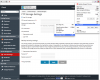
if i open the FTP parameters, i cannot change anything because there is no button to validate the new settings (check attached screenshot).
Of course the backup fails with following error in the log :
I can connect to the ftp backup server, from this plesk server, send and retrieve files without problem, what can i try to fix this issue?
Thank you!
I setup this server a few weeks ago, and at first the FTP backup was working fine, now it's not.
When i open the backup manager it takes at least 2 minutes to respond and finally show the backup manager page.
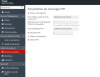
if i open the FTP parameters, i cannot change anything because there is no button to validate the new settings (check attached screenshot).
Of course the backup fails with following error in the log :
Code:
ERROR:      ()      Unable to rotate dump: The dump rotation is failed with code '151' at /opt/psa/admin/bin/plesk_agent_manager line 1245.

ERROR:      ()      Unable to upload dump to FTP, it remains in server repository and you can manually download and upload it to FTP. Upload diagnostic message: Repository error: Unable to save data to an archive. Check whether the target directory is accessible for writing. For more information, see the log file (/opt/psa/PMM/sessions/2015-10-13-034109.169/migration.log)
I can connect to the ftp backup server, from this plesk server, send and retrieve files without problem, what can i try to fix this issue?
Thank you!