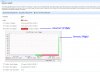
T tdurham Guest Aug 8, 2011 #1 I have updated my logical drive size of /var to 100GB. The chart shows 100GB but the red warning light is still on and it reads (3.67 of 3.99gb). Anyone know how to fix this in Plesk so that it is reading the correct drive size for /var?? Attachments Plesk-Partition-Error.jpg 396.5 KB · Views: 7
I have updated my logical drive size of /var to 100GB. The chart shows 100GB but the red warning light is still on and it reads (3.67 of 3.99gb). Anyone know how to fix this in Plesk so that it is reading the correct drive size for /var??
T tdurham Guest Aug 8, 2011 #2 Found the fix!! here you go. For anyone who wants to know here is the fix. I can't believe this was so freakin hard to find the answer to!! Here is a great tutorial on updaing the logical volume sizes on centos (or anything) and I have plesk. http://faq.1and1.com/dedicated_servers/root_server/linux_admin_help/17.html Now after you update your logical drives they are not updated in the Plesk health monitor automatically. You have to run this from the command line: /usr/local/psa/bin/sw-engine-pleskrun /usr/local/psa/admin/plib/scripts/setup-health-monitor.php That info came from this article: http://kb.odin.com/en/9431
Found the fix!! here you go. For anyone who wants to know here is the fix. I can't believe this was so freakin hard to find the answer to!! Here is a great tutorial on updaing the logical volume sizes on centos (or anything) and I have plesk. http://faq.1and1.com/dedicated_servers/root_server/linux_admin_help/17.html Now after you update your logical drives they are not updated in the Plesk health monitor automatically. You have to run this from the command line: /usr/local/psa/bin/sw-engine-pleskrun /usr/local/psa/admin/plib/scripts/setup-health-monitor.php That info came from this article: http://kb.odin.com/en/9431

 Facebook
 Twitter