Follow along with the video below to see how to install our site as a web app on your home screen.
Note: This feature may not be available in some browsers.
The APS Catalog has been deprecated and removed from all Plesk Obsidian versions. Applications already installed from the APS Catalog will continue working. However, Plesk will no longer provide support for APS applications.
Please be aware: with the Plesk Obsidian 18.0.78 release, the support for the ngx_pagespeed.so module will be deprecated and removed from the sw-nginx package.
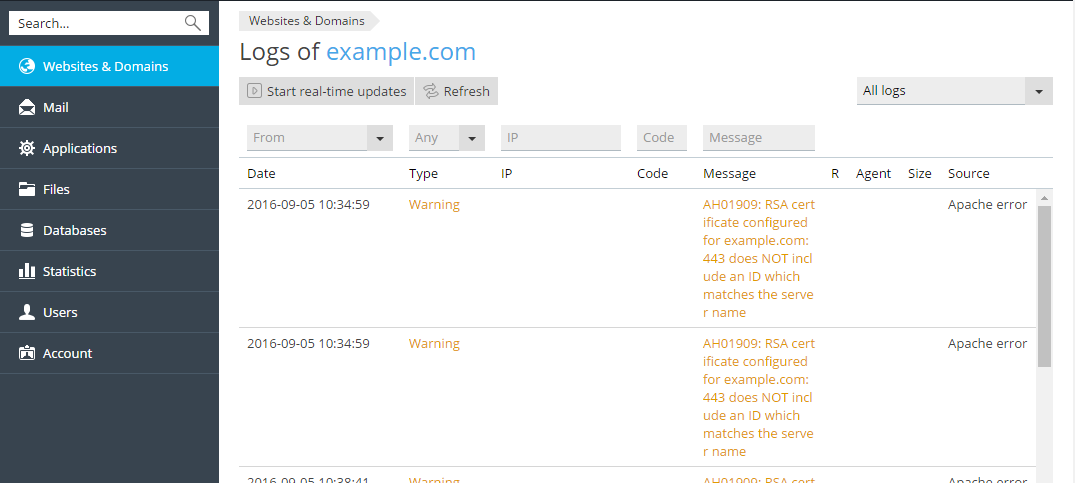
When I look at the logs in the Log Browser (Websites and Domains > Logs), every entry is doubled. Why?
I think even in the official documentation for Plesk you can see this bug:
The screenshot in first post is from the official documentation of Plesk!
In my logs files there are only single entries, but in the plesk Log Browser, they are doubled:
This is my screenshot
When I start live logging, it shows single logs, but when refreshed everything is doubled!
This happens on some but not all domains.
Looks like it's happening again. Double log entries until Plesk checks for updates at 3am, then back to normal single log entries for several hours and back to double log entries. We didn't experience this until the upgrade to 17.8.
Double logs occurs exactly 12 hours after Plesk checks for updates. So, our Plesk server checks for updates at 3:16AM and exactly at 3:16PM we begin to see double double log log entries entries. Outside of the 12 hour window, logs are perfect.
Due to the L1TF issue we had to reboot the server to use the updated kernel and for the first time, the double log entries have stopped. We know it wasn't due to the reboot, since this didn't solve it before, but it seems to have finally stopped.
I'll mark the thread SOLVED and will reopen if it occurs again.