• The new Python extension is now available. It allows customers to deploy and manage WSGI-based Python applications on their websites directly from Plesk.
  • The Plesk Mobile apps for iOS and Android and the Plesk Mobile Center extension have been deprecated, and are no longer available for new installations. In Plesk Obsidian 18.0.84, the Plesk Mobile Center extension will be removed from servers during the upgrade, and the Plesk Mobile apps will lose their server management features.
  • The Social Login extension has been deprecated and will be removed in Plesk Obsidian 18.0.84. After that, it will no longer be possible to log in to Plesk with a Google, Facebook, GitHub account, or with a passkey. Plesk usernames and passwords, as well as logging in with a WebPros Account, are not affected.

Question mysql.user table does not exist recovery?!

SalamiC

New Pleskian
Hi Forum Folks,

on a client machine the mysql.user table does not exist anymore. Is there a way to recover it from a auto backup?

The machine is a Windows Server 2016 running Ples Onyx 17.5.3. All Components are out-of-the-box.

Any idea is highly appreciated.
Salami C.
 
Hi,
You have to search for backup file .sql if exist of course then restore it
Before upgrading Plesk or installing important MySQL updates, Plesk Installer creates a pre-upgrade dump of system databases. Pre-upgrade dumps are used to restore the system to previous state if Plesk upgrade/update has failed.
The following databases are included in it (in order of appearance):
  • mysql - MySQL system database
  • psa - Plesk system database
  • apsc - Plesk application database
  • horde - Horde database, if installed
Windows Server
On Windows servers, every night Plesk automatically creates a daily dump of system databases in scope of the scheduled task Backup of vital Plesk settings in Windows Task Scheduler (command C:\Program Files (x86)\Plesk\admin\bin\sshost.exe --settings-backup).

These dump files are located in %plesk_dir%Mysql\Backup. The following Plesk databases are backed up:

  • psa - Plesk system database
  • apsc - Plesk application database
  • horde - Horde database, if installed
How to back up / restore Plesk system databases
 
Hi khoubeib bach,

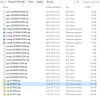
that's what I found in the %plesk_dir%\Mysql\Backup folder, see attached. Is it that, what I'm looking for?:confused:

I also check now, the linked how to article.

Thx so far.
 

Attachments

  • backup-content.jpg
    backup-content.jpg
    124.4 KB · Views: 8
Last edited:
You are right, I could not found a mysql backup. With what I had, I gave it some tries, without success.

Now, I moved to a regular web hosting and at the moment I'm uploading the last working copy of the website.

Thanks for your help!
Salami C
 
Back
Top