Follow along with the video below to see how to install our site as a web app on your home screen.
Note: This feature may not be available in some browsers.
The APS Catalog has been deprecated and removed from all Plesk Obsidian versions. Applications already installed from the APS Catalog will continue working. However, Plesk will no longer provide support for APS applications.
Please be aware: with the Plesk Obsidian 18.0.78 release, the support for the ngx_pagespeed.so module will be deprecated and removed from the sw-nginx package.
Hi,
You have to search for backup file .sql if exist of course then restore it
Before upgrading Plesk or installing important MySQL updates, Plesk Installer creates a pre-upgrade dump of system databases. Pre-upgrade dumps are used to restore the system to previous state if Plesk upgrade/update has failed.
The following databases are included in it (in order of appearance):
mysql - MySQL system database
psa - Plesk system database
apsc - Plesk application database
horde - Horde database, if installed
Windows Server
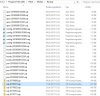
On Windows servers, every night Plesk automatically creates a daily dump of system databases in scope of the scheduled task Backup of vital Plesk settings in Windows Task Scheduler (command C:\Program Files (x86)\Plesk\admin\bin\sshost.exe --settings-backup).
These dump files are located in %plesk_dir%Mysql\Backup. The following Plesk databases are backed up: