Facebook
 Twitter
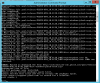
I've current got 3 windows servers running version 18.0.24. They all show there is an update to 18.0.28. My auto update settings are set to "Automatically Install Plesk updates". Never had an issue before with the auto updating. But since it wasn't updating on it's own, I tried to manually update one of them using both the web installer and the console. But I get an MD5 checksum error when it tries to download and install pool/release/PLESK-Win_18.0.28_3485/dist-windows/plesk-nssm.zip. Is that something on my end causing that?
-
Debian 11 has reached its end-of-life (vendor EOL date - August 31, 2026). Plesk Obsidian 18.0.81 is the last release to support it.
If you are running Plesk Obsidian on Debian 11, we recommend you upgrade those servers to Debian 12 using our dist-upgrade tool.
Issue Plesk Auto Updates Not Updating
- Thread starter johnny a
- Start date