• The APS Catalog has been deprecated and removed from all Plesk Obsidian versions.
    Applications already installed from the APS Catalog will continue working. However, Plesk will no longer provide support for APS applications.
  • Please be aware: with the Plesk Obsidian 18.0.78 release, the support for the ngx_pagespeed.so module will be deprecated and removed from the sw-nginx package.

Important Plesk Migrator extension

Hi,

We have an error on Plesk Migrator since this morning.

I can see that there was an upgrade to version 2.29.0-3148

When you clic on an already registered migration, to go to detail there is an error page :

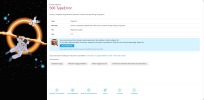
500 TypeError​

version_compare(): Argument #1 ($version1) must be of type string, array given

Best regards,
 

Attachments

  • Erreur-serveur-07-08-2025_09_22_AM.png
    Erreur-serveur-07-08-2025_09_22_AM.png
    259.9 KB · Views: 4
Hi,

Is Debian 13 already supported as source server for the migration wizard tool?

Error:
Failed to deploy Python on source server
Cause: Source server OS 'debian 13 x86_64' on the source server 'directadmin' (x.x.x.x) is not supported
That is a critical error, migration was stopped.

System information:
  • Source server
    • Control panel: DirectAdmin 1.695
    • OS: Debian 13 x86_64
  • Target server
    • Control panel: Plesk Obsidian 18.0.76 Update #2
    • OS: Ubuntu 24.04.4 LTS
    • Plesk Migration: 2.31.4-8796
 
@Woutuit , I have opened an internal task for our team to investigate the reported issue. Plesk supports Debian 13, so in theory, the migration should not fail. I will follow up with more details as soon as possible.
 
@Woutuit , the behavior was confirmed as a bug identified with ID PMT-5658. Thank you for bringing our attention to the issue. Our team will introduce a fix in the upcoming Plesk release (18.0.77).
 
@Woutuit , just wanted to follow-up on the bug you reported. It has been fixed as of Plesk Migrator 2.32.1 (released yesterday). Thank you for bringing our attention to the issue.
 
Hi,

Is Debian 13 already supported as source server for the migration wizard tool?

Error:


System information:
  • Source server
    • Control panel: DirectAdmin 1.695
    • OS: Debian 13 x86_64
  • Target server
    • Control panel: Plesk Obsidian 18.0.76 Update #2
    • OS: Ubuntu 24.04.4 LTS
    • Plesk Migration: 2.31.4-8796

@Woutuit,

It is not an issue about Debian support, as @Sebahat.hadzhi already correctly explained.

The Migration Manager had (and still has) some bugs that are not solved in a timely manner and this

"Failed to deploy Python on source server"

is one of them : the Migration Manager failed to deploy Python on the Debian source server.

Stated differently, Plesk is supporting Debian fully, but the Migration Manager has some issues to deploy Python on a Debian based Plesk instance.

Kind regards........
 
@Woutuit,

It is not an issue about Debian support, as @Sebahat.hadzhi already correctly explained.

The Migration Manager had (and still has) some bugs that are not solved in a timely manner and this

"Failed to deploy Python on source server"

is one of them : the Migration Manager failed to deploy Python on the Debian source server.

Stated differently, Plesk is supporting Debian fully, but the Migration Manager has some issues to deploy Python on a Debian based Plesk instance.

Kind regards........
Hi,

Thanks for the update. Is there a option to bypass the detect of the Debian version so that i can make an migrate.?

Thanks,

Wout
 
Hi,

Thanks for the update. Is there a option to bypass the detect of the Debian version so that i can make an migrate.?

Thanks,

Wout
@Woutuit

To be honest, not that I am aware of.

That is, I am aware of some very very "dirty workarounds", but it is better to not elaborate upon that - for many reasons.


If you need a migration in general sense, then it is often recommended to wait until the bug fix has been applied to an update - just install the update!


If you really need an instant migration and are willing to do some manual tweaking, then please note that you can use (a combination) of rsync + site importer (for the site databases, if any).

There - often, but not always - is no need to migrate server settings.

Moreover, the necessity to migrate your server settings should be virtually non-existent, since you are migrating from Debian 13 x86_64 to Ubuntu 24.04.4 LTS (and they are essentially flavors of the same, to some extent and/or to a high degree).

Nevertheless, the "manual migration" is a bit of a fuzz, in comparison to the easy-and-robust migration with Migration Manager.

I should recommend using Migration Manager, but you should know that manual migration is also possible.


As a final note, it is always good to realize that you can (either) run the Migration Manager after a "manual migration", in order to remove all flaws of the manual migration and/or to enhance consistency across source and target server, (or) leave it "as is", since any new server has the bless of being completely clean of all the nonsense of extensions, of rubbish files, of failed packages, of phantom packages, files and directories and so on.

I can always recommend to migrate any existing server to a new, clean server ....... every odd couple of months.


I hope the above helps a (tiny) bit!


Kind regards....
 
Back
Top