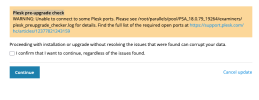
hi, its not behind a NAT. Heres the log file. Seems to be Nº14 its got the error.
INFO: Installed Plesk version/build: 18.0.78 Ubuntu 24.04 1800260617.20...
INFO: STEP 0: Detect system configuration...
INFO: OS: Ubuntu 24.04.4 LTS \n \l
INFO: Arch: x86_64
INFO: Validating the database password...
INFO: Result: OK
INFO: Pre-Upgrade analyzer version: 18.0.79.0...
INFO: STEP 1: Checking for main IP address...
INFO: Result: OK
INFO: STEP 2: Checking existence of Plesk user "root" for MariaDB/MySQL database servers...
INFO: Result: OK
INFO: STEP 3: Checking proftpd settings...
INFO: Result: OK
INFO: STEP 4: Checking the 'Interval' parameter in the sw-collectd configuration file...
INFO: Result: OK
INFO: STEP 5: Checking Apache status...
INFO: Result: OK
INFO: STEP 6: Checking Panel files for the immutable bit attribute...
INFO: Result: OK
INFO: STEP 7: Checking the possibility to change the permissions of files in the DUMP_D directory...
INFO: Result: OK
INFO: STEP 8: Checking consistency of the IP addresses list in the Panel database...
INFO: Result: OK
INFO: STEP 9: Checking for custom web server configuration templates...
INFO: Result: OK
INFO: STEP 10: Checking for domains with mixed case names...
INFO: Result: OK
INFO: STEP 11: Checking symbolic link /usr/local/psa on /opt/psa...
INFO: Result: OK
INFO: STEP 12: Detecting if encrypted passwords are used...
INFO: Result: OK
INFO: STEP 13: Checking table "servers" in database "mysql"...
INFO: The administrator's password for the default MariaDB/MySQL server is encrypted.
INFO: Result: OK
INFO: STEP 14: Checking the availability of Plesk Panel TCP ports...
INFO: Unable to connect to IP address 217.154.34.159 on Plesk Panel secure HTTPS port 8443: Connection refused
WARNING: Unable to connect to some Plesk ports. Please see /root/parallels/pool/PSA_18.0.79_19264/examiners/plesk_preupgrade_checker.log for details. Find the full list of the required open ports at
https://support.plesk.com/hc/articles/12377821243159
INFO: Result: WARNING
INFO: STEP 15: Checking if Atmail is used by domains...
INFO: Result: OK
INFO: STEP 16: Checking for Protected Directory Users with duplicates in login field....
INFO: STEP 17: Checking "domains" table with duplicates in guid field....
INFO: STEP 18: Checking "clients" table with duplicates in guid field....
INFO: STEP 19: Checking if any rules are configured in the Firewall extension...

 Facebook
 Twitter