Facebook
 Twitter
Hello,
I have recently moved from WHM to Plesk 11, and i am trying to setup dns servers for my domain.
First domain igriceigrice.net i would like to use as default. In my domain register manager i have created ns1 and ns2 for that domain, added IP adress for both, and that's fine...
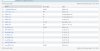
Problem is with my second domain elitiko.com. In domain manager i just changed it's name servers to ns1.igriceigrice.net and ns2.igriceigrice.net and expected that will work, but didn't. You can see DNS record for elitiko.com in attachment.
I will add several domains on that server, so i would like to use ns1.igriceigrice.net and ns2.igriceigrice.net.
I would really appreciate your help.
Thanks.
I have recently moved from WHM to Plesk 11, and i am trying to setup dns servers for my domain.
First domain igriceigrice.net i would like to use as default. In my domain register manager i have created ns1 and ns2 for that domain, added IP adress for both, and that's fine...
Problem is with my second domain elitiko.com. In domain manager i just changed it's name servers to ns1.igriceigrice.net and ns2.igriceigrice.net and expected that will work, but didn't. You can see DNS record for elitiko.com in attachment.
I will add several domains on that server, so i would like to use ns1.igriceigrice.net and ns2.igriceigrice.net.
I would really appreciate your help.
Thanks.