• The APS Catalog has been deprecated and removed from all Plesk Obsidian versions.
    Applications already installed from the APS Catalog will continue working. However, Plesk will no longer provide support for APS applications.
  • Please be aware: with the Plesk Obsidian 18.0.78 release, the support for the ngx_pagespeed.so module will be deprecated and removed from the sw-nginx package.

Site Statistics, Start date : Today :(

D

Dupont

Guest
Hello,

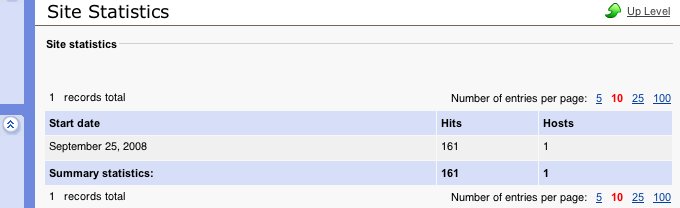
The site statistics page always displays hits since "today" :( That is to say, at the moment I'm writing, it says :

Start date :
September 22, 2008

It's the same for all sites of my installation : "September 22, 2008"... and tomorrow, it will display "September
23, 2008"...

Is it possible to display stats since the creation date of the site, or something like that ?

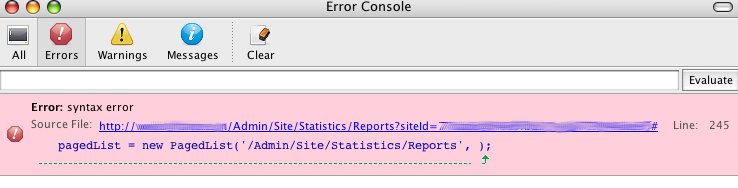
Besides, I get a javascript error on the statistics page (syntax error) :

pagedList = new PagedList('/Admin/Site/Statistics/Reports', );

---

Product version : 4.2.0
 
I have checked this situation on 4.2.0 installation and it looks good. Start date is shown as date of site creation. Also, I did not meet any java script errors. Could you provide here the screen shots with these issues?
Also, I can suggest you to upgrade Sitebuilder at least to 4.2.3 version but better to latest 4.5.0 one. All instructions for upgrade you can find from documentation here: http://www.parallels.com/en/sitebuilder/docs
 
thanks for the answer. here are the screenshots :

site statistics :

site_statistics-6ac215.jpg


javascript error :

error_console-6ac222.jpg
 
It looks like there was such an issue in previous Sitebuilder version 4.2.0. I have found some patched files which you could try to apply on your server.
In the attachment you can find patched_files.zip file which includes following files:

include\Modules\Statistics\Attendance.php
include\Modules\Statistics\Attendance\Broker.php
include\SB\Views\Admin\Site\Statistics\Reports.php
resources\modules\include\Modules\Statistics\Attendance\Broker.php

Before applying these patched files make a copy of existing ones, just in case.

After files are applied, you should re-publish the entire site and check this situation one more time.

You can also upgrade to more newer version 4.2.3 or better 4.5 where this situation already resolved.
 

Attachments

  • patched_files.zip
    31.3 KB · Views: 25
Back
Top