• Debian 11 is approaching its end-of-life (vendor EOL date - August 31, 2026). Plesk Obsidian 18.0.80 will be the last release to support it.
    If you are running Plesk Obsidian on Debian 11, we recommend you upgrade those servers to Debian 12 using our dist-upgrade tool.
  • We plan to deprecate and remove the support for XML RPC protocol versions earlier than 1.6.9.1 in Plesk Obsidian 18.0.82. We strongly recommend that you update all existing integrations using earlier versions of the XML RPC protocol to comply with the version 1.6.9.1 specification.

Site Statistics, Start date : Today :(

D

Dupont

Guest
Hello,

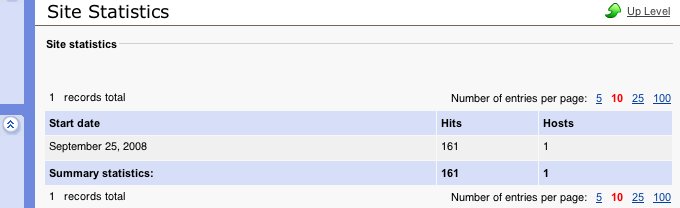
The site statistics page always displays hits since "today" :( That is to say, at the moment I'm writing, it says :

Start date :
September 22, 2008

It's the same for all sites of my installation : "September 22, 2008"... and tomorrow, it will display "September
23, 2008"...

Is it possible to display stats since the creation date of the site, or something like that ?

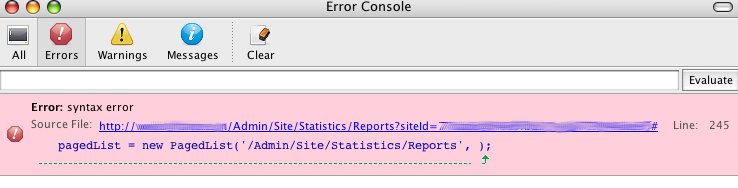
Besides, I get a javascript error on the statistics page (syntax error) :

pagedList = new PagedList('/Admin/Site/Statistics/Reports', );

---

Product version : 4.2.0
 
I have checked this situation on 4.2.0 installation and it looks good. Start date is shown as date of site creation. Also, I did not meet any java script errors. Could you provide here the screen shots with these issues?
Also, I can suggest you to upgrade Sitebuilder at least to 4.2.3 version but better to latest 4.5.0 one. All instructions for upgrade you can find from documentation here: http://www.parallels.com/en/sitebuilder/docs
 
thanks for the answer. here are the screenshots :

site statistics :

site_statistics-6ac215.jpg


javascript error :

error_console-6ac222.jpg
 
It looks like there was such an issue in previous Sitebuilder version 4.2.0. I have found some patched files which you could try to apply on your server.
In the attachment you can find patched_files.zip file which includes following files:

include\Modules\Statistics\Attendance.php
include\Modules\Statistics\Attendance\Broker.php
include\SB\Views\Admin\Site\Statistics\Reports.php
resources\modules\include\Modules\Statistics\Attendance\Broker.php

Before applying these patched files make a copy of existing ones, just in case.

After files are applied, you should re-publish the entire site and check this situation one more time.

You can also upgrade to more newer version 4.2.3 or better 4.5 where this situation already resolved.
 

Attachments

  • patched_files.zip
    31.3 KB · Views: 25
Back
Top