Facebook
 Twitter
Powerdynamo
New Pleskian
trying to update i get:
Execution failed.
Command: autoinstaller
Arguments: Array
(
[0] => --select-product-id
[1] => plesk
[2] => --select-release-current
[3] => --upgrade-installed-components
[4] => --include-components-from-class
[5] => vendor=parallels
[6] => --include-components-from-class
[7] => patched
)
...
Downloading file PMM_0.1.10/pmm-0.1.10-ubt14.04-x86_64.inf3: 100% was finished.
OK
Registering i386 architecture support
Synchronizing the Debian APT package index files...
Ign http://mirror.eu.oneandone.net trusty InRelease
...
Ign https://autoinstall.plesk.com trusty/all Translation-en
Hit http://updates.atomicorp.com trusty/main i386 Packages
Ign http://updates.atomicorp.com trusty/main Translation-en
E: dpkg was interrupted, you must manually run 'dpkg --configure -a' to correct the problem.
Warning: there are errors in 'apt-get update'
Detecting installed product components.
Retrieving information about the installed license key...
Launching component checkers...
Downloading file PSA_12.5.30/examiners/panel_preupgrade_checker.php: 0%
Downloading file PSA_12.5.30/examiners/panel_preupgrade_checker.php: 100% was finished.
Downloading file PSA_12.5.30/examiners/php_launcher.sh: 0%
Downloading file PSA_12.5.30/examiners/php_launcher.sh: 100% was finished.
Checking whether the package dependencies are resolved.
E: dpkg was interrupted, you must manually run 'dpkg --configure -a' to correct the problem.
---X--- `apt-get` output ---------------------
~empty
---------------------- `apt-get` output ---X---
Collecting error details into the log file...
ERROR: Installation will not continue
The apg-get failed with the following message:
Not all packages were installed.
Please contact product technical support.
----------------
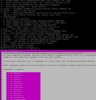
when i try to manually dpkg --configure -a i get stuck at mailman language selection
Execution failed.
Command: autoinstaller
Arguments: Array
(
[0] => --select-product-id
[1] => plesk
[2] => --select-release-current
[3] => --upgrade-installed-components
[4] => --include-components-from-class
[5] => vendor=parallels
[6] => --include-components-from-class
[7] => patched
)
...
Downloading file PMM_0.1.10/pmm-0.1.10-ubt14.04-x86_64.inf3: 100% was finished.
OK
Registering i386 architecture support
Synchronizing the Debian APT package index files...
Ign http://mirror.eu.oneandone.net trusty InRelease
...
Ign https://autoinstall.plesk.com trusty/all Translation-en
Hit http://updates.atomicorp.com trusty/main i386 Packages
Ign http://updates.atomicorp.com trusty/main Translation-en
E: dpkg was interrupted, you must manually run 'dpkg --configure -a' to correct the problem.
Warning: there are errors in 'apt-get update'
Detecting installed product components.
Retrieving information about the installed license key...
Launching component checkers...
Downloading file PSA_12.5.30/examiners/panel_preupgrade_checker.php: 0%
Downloading file PSA_12.5.30/examiners/panel_preupgrade_checker.php: 100% was finished.
Downloading file PSA_12.5.30/examiners/php_launcher.sh: 0%
Downloading file PSA_12.5.30/examiners/php_launcher.sh: 100% was finished.
Checking whether the package dependencies are resolved.
E: dpkg was interrupted, you must manually run 'dpkg --configure -a' to correct the problem.
---X--- `apt-get` output ---------------------
~empty
---------------------- `apt-get` output ---X---
Collecting error details into the log file...
ERROR: Installation will not continue
The apg-get failed with the following message:
Not all packages were installed.
Please contact product technical support.
----------------
when i try to manually dpkg --configure -a i get stuck at mailman language selection