• The APS Catalog has been deprecated and removed from all Plesk Obsidian versions.
    Applications already installed from the APS Catalog will continue working. However, Plesk will no longer provide support for APS applications.
  • Please be aware: with the Plesk Obsidian 18.0.78 release, the support for the ngx_pagespeed.so module will be deprecated and removed from the sw-nginx package.

Issue BUG Plesk 18.0.77 - FTP backups no longer work

jfh

New Pleskian
Since version 18.0.77, FTP backups no longer work, displaying the following error message:

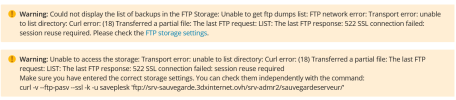
Could not display the list of backups in the FTP Storage: Unable to get ftp dumps list: FTP network error: Transport error: unable to list directory

We have check with the command curl -v --ftp-pasv --ssl -k and everything is fine
 
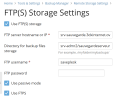
Hi, @jfh . Could you please provide your OS and confirm the exact Remote FTP settings in Tools & Settings Backup Manager > Remote Storage settings. Also, can you please confirm the full error message you encounter? Thank you in advance.
 
Hi, @jfh . Could you please provide your OS and confirm the exact Remote FTP settings in Tools & Settings Backup Manager > Remote Storage settings. Also, can you please confirm the full error message you encounter? Thank you in advance.
Hi, The OS is Debian other informations in Attache files. The curl command works.
 

Attachments

  • Capture d'écran 2026-04-16 091051.png
    Capture d'écran 2026-04-16 091051.png
    77.3 KB · Views: 10
  • Capture d'écran 2026-04-16 082331.png
    Capture d'écran 2026-04-16 082331.png
    63.2 KB · Views: 10
Thank you. Could you please also confirm:

1. The Debian version
2. What's the exact output when you execute the curl request from the error message
3. What FTP service does your remote server use

Thanks in advance.
 
Thank you. Could you please also confirm:

1. The Debian version
2. What's the exact output when you execute the curl request from the error message
3. What FTP service does your remote server use

Thanks in advance.
1. The Debian version :
Debian 10.13

2. What's the exact output when you execute the curl request from the error message
* TCP_NODELAY set
* Connected to srv-XXXX.XXXXXXX.ovh (XX.XX.XX.XX) port 21 (#0)
< 220 (vsFTPd 3.0.3)
> AUTH SSL
< 234 Proceed with negotiation.
* successfully set certificate verify locations:
* CAfile: none
CApath: /etc/ssl/certs
* TLSv1.3 (OUT), TLS handshake, Client hello (1):
* TLSv1.3 (IN), TLS handshake, Server hello (2):
* TLSv1.3 (OUT), TLS change cipher, Change cipher spec (1):
* TLSv1.3 (OUT), TLS handshake, Client hello (1):
* TLSv1.3 (IN), TLS handshake, Server hello (2):
* TLSv1.3 (IN), TLS handshake, Encrypted Extensions (8):
* TLSv1.3 (IN), TLS handshake, Request CERT (13):
* TLSv1.3 (IN), TLS handshake, Certificate (11):
* TLSv1.3 (IN), TLS handshake, CERT verify (15):
* TLSv1.3 (IN), TLS handshake, Finished (20):
* TLSv1.3 (OUT), TLS handshake, Certificate (11):
* TLSv1.3 (OUT), TLS handshake, Finished (20):
* SSL connection using TLSv1.3 / TLS_AES_256_GCM_SHA384
* Server certificate:
* subject: CN=ns3164682.ip-51-89-98.eu
* start date: Jan 4 13:30:40 2022 GMT
* expire date: Jan 2 13:30:40 2032 GMT
* issuer: CN=ns3164682.ip-51-89-98.eu
* SSL certificate verify result: self signed certificate (18), continuing anyway.
> USER saveplesk
* TLSv1.3 (IN), TLS handshake, Newsession Ticket (4):
* old SSL session ID is stale, removing
< 331 Please specify the password.
> PASS Jk_ui095-36Gg
< 230 Login successful.
> PBSZ 0
< 200 PBSZ set to 0.
> PROT P
< 200 PROT now Private.
> PWD
< 257 "/" is the current directory
* Entry path is '/'
> CWD srv-admr2
* ftp_perform ends with SECONDARY: 0
< 250 Directory successfully changed.
> CWD admr.org
< 250 Directory successfully changed.
> EPSV
* Connect data stream passively
< 229 Entering Extended Passive Mode (|||10105|)
* Trying XX.XX.XX.XX...
* TCP_NODELAY set
* Connecting to XX.XX.XX.XX (XX.XX.XX.XX) port 10105
* Connected to srv-XXXX.XXXXXXX.ovh (XX.XX.XX.XX) port 21 (#0)
> TYPE A
< 200 Switching to ASCII mode.
> LIST
< 150 Here comes the directory listing.
* Maxdownload = -1
* Doing the SSL/TLS handshake on the data stream
* successfully set certificate verify locations:
* CAfile: none
CApath: /etc/ssl/certs
* SSL re-using session ID
* TLSv1.3 (OUT), TLS handshake, Client hello (1):
* TLSv1.3 (IN), TLS handshake, Server hello (2):
* TLSv1.3 (OUT), TLS change cipher, Change cipher spec (1):
* TLSv1.3 (OUT), TLS handshake, Client hello (1):
* TLSv1.3 (IN), TLS handshake, Server hello (2):
* TLSv1.3 (IN), TLS handshake, Encrypted Extensions (8):
* TLSv1.3 (IN), TLS handshake, Finished (20):
* TLSv1.3 (OUT), TLS handshake, Finished (20):
* SSL connection using TLSv1.3 / TLS_AES_256_GCM_SHA384
* Server certificate:
* subject: CN=ns3164682.ip-51-89-98.eu
* start date: Jan 4 13:30:40 2022 GMT
* expire date: Jan 2 13:30:40 2032 GMT
* issuer: CN=ns3164682.ip-51-89-98.eu
* SSL certificate verify result: self signed certificate (18), continuing anyway.
* TLSv1.3 (IN), TLS handshake, Newsession Ticket (4):
* old SSL session ID is stale, removing
-rw-r--r-- 1 1001 1001 2353547219 Mar 04 22:36 backup_XXXXXXXXXXXX.tar

* TLSv1.3 (IN), TLS alert, close notify (256):
* Remembering we are in dir "srv-admr2/admr.org/"
* TLSv1.3 (OUT), TLS alert, close notify (256):
< 226 Directory send OK.
* Connection #0 to host srv-XXXX.XXXXXXX.ovh left intact


3. What FTP service does your remote server use
vsftpd
 
I am experiencing a similar issue with FTPS with Passive Mode since upgrading Plesk. The error "TLS session of data connection not resumed" is reported in the FileZilla logs.

Previously, we encountered an issue configuring FTPS backup and resolved it by adding the setting "ftpForbidReuseConnection = 1" to the panel.ini file, as referenced in the following thread:
Resolved - plesk Backup Tool - FTP mode

I have since tried removing this setting, but the issue persists.

If I disable FTPS, the backups complete successfully.

1. The Debian version
Debian 11.11
2. What's the exact output when you execute the curl request from the error message
Enter host password for user 'test':
* Trying x.x.x.x:21...
* Connected to x.x.com (x.x.x.x) port 21 (#0)
< 220-FileZilla Server 1.12.5
< 220 Please visit FileZilla - The free FTP solution
> AUTH SSL
< 234 Using authentication type TLS.
* successfully set certificate verify locations:
* CAfile: /etc/ssl/certs/ca-certificates.crt
* CApath: /etc/ssl/certs
* TLSv1.3 (OUT), TLS handshake, Client hello (1):
* TLSv1.3 (IN), TLS handshake, Server hello (2):
* TLSv1.3 (IN), TLS handshake, Encrypted Extensions (8):
* TLSv1.3 (IN), TLS handshake, Certificate (11):
* TLSv1.3 (IN), TLS handshake, CERT verify (15):
* TLSv1.3 (IN), TLS handshake, Finished (20):
* TLSv1.3 (OUT), TLS change cipher, Change cipher spec (1):
* TLSv1.3 (OUT), TLS handshake, Finished (20):
* SSL connection using TLSv1.3 / TLS_AES_256_GCM_SHA384
* Server certificate:
* subject: C=XX; ST=XX; L=XX; O=ABC; OU=ABC FTP; CN=x.x.com
* start date: Apr 13 14:47:37 2026 GMT
* expire date: Apr 10 14:47:37 2036 GMT
* issuer: C=XX; ST=XX; L=XX; O=ABC; OU=ABC FTP; CN=x.x.com
* SSL certificate verify result: self signed certificate (18), continuing anyway.
> USER test
< 331 Please, specify the password.
> PASS klse1005
< 230 Login successful.
> PBSZ 0
< 200 PBSZ=0
> PROT P
< 200 Protection level set to P
> PWD
< 257 "/" is current directory.
* Entry path is '/'
* Request has same path as previous transfer
> EPSV
* Connect data stream passively
* ftp_perform ends with SECONDARY: 0
* TLSv1.3 (IN), TLS handshake, Newsession Ticket (4):
< 229 Entering Extended Passive Mode (|||51055|)
* Trying x.x.x.x:51055...
* Connecting to x.x.x.x (x.x.x.x) port 51055
* Connected to x.x.com (x.x.x.x) port 21 (#0)
> TYPE A
< 200 Type set to A
> LIST
< 150 Starting data transfer.
* Maxdownload = -1
* Doing the SSL/TLS handshake on the data stream
* successfully set certificate verify locations:
* CAfile: /etc/ssl/certs/ca-certificates.crt
* CApath: /etc/ssl/certs
* SSL re-using session ID
* TLSv1.3 (OUT), TLS handshake, Client hello (1):
* TLSv1.3 (IN), TLS handshake, Server hello (2):
* TLSv1.3 (IN), TLS handshake, Encrypted Extensions (8):
* TLSv1.3 (IN), TLS handshake, Finished (20):
* TLSv1.3 (OUT), TLS change cipher, Change cipher spec (1):
* TLSv1.3 (OUT), TLS handshake, Finished (20):
* SSL connection using TLSv1.3 / TLS_AES_256_GCM_SHA384
* Server certificate:
* subject: C=XX; ST=XXX; L=XXXXX; O=ABC; OU=ABC FTP; CN=x.x.com
* start date: Apr 13 14:47:37 2026 GMT
* expire date: Apr 10 14:47:37 2036 GMT
* issuer: C=XX; ST=XXX; L=XXXXX; O=ABC; OU=ABC FTP; CN=x.x.com
* SSL certificate verify result: self signed certificate (18), continuing anyway.
* TLSv1.3 (IN), TLS alert, close notify (256):
* Remembering we are in dir ""
* TLSv1.3 (OUT), TLS alert, close notify (256):
< 226 Operation successful
* Connection #0 to host x.x.com left intact
3. What FTP service does your remote server use
FileZilla Server 1.12.5
 
Thank you both for the report. I have configured a test vsftpd server and Debian 10 server with Plesk 18.0.77 updt. 1 and attempted to replicate the reported issue, but the backups are successfully created and transferred on system and subscription level. Thus, I cannot classify the issue as a Plesk bug.

Could you please double-check the FTP server and confirm whether you have it configured with require_ssl_reuse=YES?
 
I can confirm the same issue here after updating to Plesk Obsidian 18.0.77 Update 2 on Debian 10.

Our remote backups to FileZilla Server 1.12.5 via FTPS in passive mode stopped working after the update. Before that, the setup had been working for a long time without problems.

On the Plesk side, the backup fails during remote directory handling / listing.
On the FileZilla Server 1.12.5 side, the log shows:

[Response] 425 Unable to build data connection: TLS session of data connection not resumed.

So in our case this looks like a compatibility problem introduced by Plesk 18.0.77 Update 2 with FTPS passive mode, especially when connecting to FileZilla Server 1.12.5.

Would be good to know whether this is already confirmed as a bug and whether there is any fix or workaround planned.
 
I can confirm the same issue here after updating to Plesk Obsidian 18.0.77 Update 2 on Debian 10.

Our remote backups to FileZilla Server 1.12.5 via FTPS in passive mode stopped working after the update. Before that, the setup had been working for a long time without problems.

On the Plesk side, the backup fails during remote directory handling / listing.
On the FileZilla Server 1.12.5 side, the log shows:

[Response] 425 Unable to build data connection: TLS session of data connection not resumed.

So in our case this looks like a compatibility problem introduced by Plesk 18.0.77 Update 2 with FTPS passive mode, especially when connecting to FileZilla Server 1.12.5.

Would be good to know whether this is already confirmed as a bug and whether there is any fix or workaround planned.

Additional information:

I can reproduce the same issue on Debian 10 and Debian 11, but I do not see it on Debian 12 or Debian 13 against the same FileZilla Server 1.12.5 target.

So from my side this does not look like a general FileZilla configuration problem. It looks more like a regression or compatibility issue affecting older Debian-based Plesk installations after the 18.0.77 Update 2 update.

At the moment, the only workaround on the affected systems is to switch from FTPS to plain FTP, which is obviously not a proper fix.
 
Would be good to know whether this is already confirmed as a bug and whether there is any fix or workaround planned.

Thank you for the report, @FloLa . The behavior has not been recognized as a Plesk bug, because it is not reproducible on a test environment. Tests have been performed by our engineers with FileZilla as well.

Could you please confirm what's the current configuration under the Protocol Policies tab on the remote FileZilla server for the user associated with the backup that is failing?
 
Thank you for the report, @FloLa . The behavior has not been recognized as a Plesk bug, because it is not reproducible on a test environment. Tests have been performed by our engineers with FileZilla as well.

Could you please confirm what's the current configuration under the Protocol Policies tab on the remote FileZilla server for the user associated with the backup that is failing?

Thank you for your response.

Current configuration under Protocol Policies on the FileZilla Server:
  • Minimum allowed TLS version: 1.2
  • Using a self-signed X.509 certificate
  • Passive mode enabled
  • Require explicit FTP over TLS enabled
Additional behavior:

If I switch the setting to "Explicit FTP over TLS and insecure plain FTP" and disable FTPS in the Plesk backups, the backup transfer works.
With "Require explicit FTP over TLS" enabled together with FTPS in Plesk, the transfer fails but only on Debian 10/11, not on Debian 12/13.
 
Thank you. Could you please confirm what option is selected for "FTPS (FTP over TLS) authentication" in Filezilla > Server > Configure > Users > plesk.user > Protocol policies tab?
 
Thank you. Could you please confirm what option is selected for "FTPS (FTP over TLS) authentication" in Filezilla > Server > Configure > Users > plesk.user > Protocol policies tab?
In the settings under "FTPS (FTP over TLS) authentication", the option "Determined by groups or system policies" is currently selected.
 
Thank you. Would it be possible to temporary change it to "Enabled - overrides groups policies" and test again? Thank you in advance.
 
Thank you. Would it be possible to temporary change it to "Enabled - overrides groups policies" and test again? Thank you in advance.
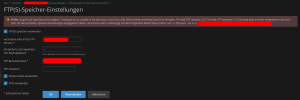
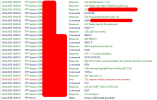
I have just tested it and changed the setting to "Enabled - overrides group policies" as requested, but unfortunately without success (see screenshots).

Er.png

Filezilla Server Log:

Er2.png

Er3.png

After that, I reverted it back to "Determined by groups or system policies" and disabled FTPS. In this configuration, everything worked normally again (also see screenshot).

Ok.png
 
Back
Top