• We value your experience with Plesk during 2026
    Please help us understand which Plesk features made your work easier this year, what is still missing and how AI should help you in Plesk ?
    Take this short 5-minutes survey. Your answers go straight into the Plesk roadmap for 2027.

Issue Invalid argument not valid semver ('' received)

Dmytro

Regular Pleskian
Server operating system version
CloudLinux 8.10
Plesk version and microupdate number
Plesk Obsidian 18.0.77 #2
Hi. Newly installed account from WHMCS (with wordpress auto installation feature).
Before wordpress actually installed if I login into Plesk I see :

plesker1.jpg

Same error if WordPress deleted manually and not detached in WPToolkit
 
Is there any update on what's causing this problem? I've got that as well, plesk
WP Toolkit - 6.10.1-10323
Plesk - Obsidian 18.0.77 Update #2 (Web Host Edition)
 
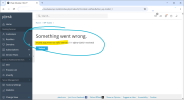
I got the same type of error message on the WP Toolkit:
Code:
Invalid argument not valid ('7.1-alpha-62492' received)

WP Toolkit version: 6.10.1-10323
Plesk Obsidian 18.0.77 Update #5 (Web Host Edition)

How to trigger the error​

- Expanding the row of the WordPress site
- Navigating with the pagination to another page containing the WordPress site

Plesk - WP Toolkit - Error - Invalid argument not valid ('7.1-alpha-62492' received).png

Plesk Panel Log​

I typed the error message into Google and switched to AI Mode which recommend to check the logs to find and fix the offending WordPress site with the command:
Code:
tail -n 100 /var/log/plesk/panel.log

Plesk - Logs - WP Toolkit List.png

Non-SemVer version numbers​

The list entry with the name WordPress Beta and the specific version number 7.1-alpha-62492 is a clear indicator that the WP Toolkit has an issue with non-semver version numbers.

WordPress​

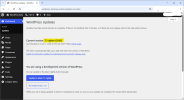
The WordPress admin is unaffeced and still be used.

WordPress - Updates - Version 7.1-alpha-62492.png

WP Toolkit​

Likely few users might be using alpha/beta versions of WordPress and therefore it might seem like an edge case, but if only one site has a non-semver version number the WP Toolkit becomes unusable which defeats the purpose of using it.

This issue is propably related to this article: https://support.plesk.com/hc/en-us/...-does-not-seem-to-be-a-WordPress-installation
 
Hi, @Alexander Girod . I am unable to replicate the behavior with a 7.1-alpha-62496 build. It's not the exact same built, but I would assume it should've triggered the error nevetheless:


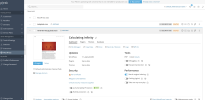
Screenshot 2026-06-15 185525.png

If the whole WP Toolkit become unresponsive this is something our team would definitely want to look through. Could you please provide more detailed steps to reproduce? As in, did you directly install the alpha build and scanned for the instance through WP Toolkit or did you update an existing instance already present in WP Toolkit? What actions were performed tehreafter? Thanks in advance.
 
Hi, @Alexander Girod . I am unable to replicate the behavior with a 7.1-alpha-62496 build. It's not the exact same built, but I would assume it should've triggered the error nevetheless:


View attachment 29501

If the whole WP Toolkit become unresponsive this is something our team would definitely want to look through. Could you please provide more detailed steps to reproduce? As in, did you directly install the alpha build and scanned for the instance through WP Toolkit or did you update an existing instance already present in WP Toolkit? What actions were performed tehreafter? Thanks in advance.
@Sebahat.hadzhi regarding the beta version you are right, the exact version number isn't important. On my side I hade a different version number before, but I was curious if the beta build at that time was the culprit and clicked on update and got to the version in my screenshot.

The "WordPress Beta" project is an old project, which I'm only opening from time to time and it has been on that server and in the Toolset for years. I think I clicked on "Rescan" to see latest additions and changes of my WordPress websites at some point. When I stumbled upon the issue I didn't actively work with the Toolkit or even on the project. I did other things in Plesk and when I came across the WP Toolkit and wanted to navigate with the pagination to another page, the error occured. The error also gets triggered hwen I try to change the number of items per page.

As far as I remeber WordPress had non-semver version numbers in the past. Which must mean, that either early beta-builds with non-semverversion weren't an issue before or something on Plesk in relation to WordPress has changed.
 
Thank you for the confirmation. It's probably a database inconsistency and the article you linked earlier should help resolve it. Please try following the steps for the website returning the Invalid argument not valid semver error. If that solution doesn't help sorting it out, please double-check /var/log/plesk/panel.log for extension/wp-toolkit related errors.
 
We found a deterministic trigger and the underlying mechanism, so you don't have to keep asking each user to install a beta build on CloudLinux to reproduce it.

This is not about a specific WP build, the OS, or the platform. The WP Toolkit parses version strings with a strict semver parser, and it does not tolerate an empty ('') or a non-semver value. Because the parse error is not caught per record, a single bad record aborts the entire instance list / overview — which is why the whole Toolkit screen dies instead of just showing one problematic row.

There are two reproducible sources:

1. Empty version ('') — any WP component whose metadata carries no version. The most common and, in practice, nearly universal one on our fleet: drop-ins, e.g. wp-content/maintenance.php when maintenance mode is active. By WordPress convention, drop-ins have no Version: header line, so the Toolkit reads '' and the semver parse throws. Maintenance mode is enabled on almost every site at some point, which is why this is so widespread — and why it also matches the original reporter's case (a WP listed before an auto-install finished, or one deleted but not detached; in both cases there is no clean version string).

2. Non-semver values — e.g. a WordPress beta 7.1-alpha-62492, or a 4-segment plugin/theme version like 2014.1231.2016.0 (this matches the report from @Alexander Girod).

Simplest reproduction: put any single WP install into maintenance mode (drop-in present), then open the WP Toolkit overview. That reproduces it without a beta build, without CloudLinux, and without any edge-case host configuration.

I verified on our server (Plesk Obsidian 18.0.82.4, dozens of WP sites) that all WP core versions are valid semver and all theme/plugin versions (authoritative wp-cli output) are valid too — so no site, theme or plugin edit can fix this. The fix has to be on the Toolkit side: tolerate empty/non-semver versions (treat them as unknown, skip them) and catch the parse exception per component instead of letting one bad record fail the whole listing.
 
Hi, @Merlin1220 . Thank you for your insights. I attempted to replicate the issue again by placing a WordPress instance in maintenance mode through the wp-cli and then manually adding wp-content/maintenance.php with some sample content (with no Version: header line). Removed the WP instance and re-scanned through WP Toolkit. I am afraid, the issue still does not reproduce on my end. In case I am missing something, would you please share the exact steps you performed on your test environment to successfully reproduce the behavior? Thanks in advance for your cooperation.
 
i
Hi, @Merlin1220 . Thank you for your insights. I attempted to replicate the issue again by placing a WordPress instance in maintenance mode through the wp-cli and then manually adding wp-content/maintenance.php with some sample content (with no Version: header line). Removed the WP instance and re-scanned through WP Toolkit. I am afraid, the issue still does not reproduce on my end. In case I am missing something, would you please share the exact steps you performed on your test environment to successfully reproduce the behavior? Thanks in advance for your cooperation.
Thank you for your reply, and for taking the time to attempt a reproduction. I would like to clarify two points, because I believe there is a misunderstanding on both — one about the environment, and one about the actual trigger.

1) This is a production server, not a test environment.

The server in question is (Plesk 18.0.81). It hosts ~50 live WordPress installations, and the error occurs on every single one of them. There is no test or staging system involved — this is my production hosting environment and the issue is not limited to one site.

2) The error is not dependent on maintenance mode.

The message "Invalid argument not valid semver ('' received)" is shown by WP Toolkit on every domain regardless of whether maintenance mode is on or off. When I first mentioned maintenance mode, it was only one of the contexts in which I observed the problem — it is not the trigger. The same error reproduces on sites that have never had maintenance mode enabled at all. So the failure is not conditional on "activating maintenance mode" and is not caused by a site- or content-side misconfiguration.

Based on what I observed, WP Toolkit's strict semver validation crashes on version strings that are not valid semver — for example a drop-in file without a Version: header (an empty string), or a pre-release/beta version such as 7.1-alpha-*. Editing site, theme, or plugin content does not help, because the fault lies in how WP Toolkit parses and validates version headers on the server side — that is a Plesk behavior, not something I can work around from the WordPress side.

Because all production domains are affected and this blocks WP Toolkit operations, I would ask that this be treated as a defect in WP Toolkit that needs fixing — specifically, a version-header parser that must tolerate missing or non-semver version strings — rather than a reproduction gap on my part.

I am glad to provide the exact WP Toolkit operation and the corresponding logs showing the error, and to confirm the exact Plesk and WP Toolkit build numbers, if that helps you reproduce it on your side. But to be clear up front: this is not a test environment, and it is not limited to maintenance mode.
 

Attachments

  • WP-Toolkit.zip
    4.1 KB · Views: 2
Hi all,

First, what's actually documented: Plesk has a KB article for exactly this error, where "not valid semver" shows up on the WordPress tab of a domain card after the WP install was removed but WP Toolkit still has its DB records:

That fits @Dmytro's original case (fresh WHMCS account / WP deleted but not detached). Detach in WP Toolkit, or clean up the orphaned rows in the sqlite DB as described in the article.

For the rest of the cases I'd be careful, because it's not proven yet. @Merlin1220 your theory about drop-ins / maintenance.php is interesting, but Sebahat couldn't reproduce it, and I couldn't find anything showing that WP Toolkit reads versions from that file. Also, a small thing from the evidence package: some of the listed versions are not strict semver either (e.g. 2.4.15.1 and 5.0.5.1 have four segments, 4.7 and 0.3 only two), so "everything is valid semver" can't be used to rule out plugins/themes. Could be the cause, could be nothing. WP Toolkit does parse versions on its own, by the way, and there was a similar bug before (EXTWPTOOLK-9313, fixed in 6.9):

What would really help is a stack trace. Temporarily add this to /usr/local/psa/admin/conf/panel.ini:

Code:
[debug]
enabled = true

[log]
filter.priority = 7

Then open the WP Toolkit overview so the error shows up, and check the log:

Code:
tail -n 200 /var/log/plesk/panel.log

Remove the debug lines again afterwards.

Second thing, completely read-only: look at what's in the WP Toolkit DB. Schema first, since I don't know the column names by heart:

Code:
sqlite3 -readonly /usr/local/psa/var/modules/wp-toolkit/wp-toolkit.sqlite3 ".schema instanceProperties"

Then list everything version-related (adjust the column name if the schema looks different):

Code:
sqlite3 -readonly -header /usr/local/psa/var/modules/wp-toolkit/wp-toolkit.sqlite3 "SELECT * FROM instanceProperties WHERE LOWER(name) LIKE '%version%' LIMIT 100;"

If there's an empty value or something that isn't a proper x.y.z in there, that would be a concrete lead for the Plesk team. If not, the log output is our best bet.

Happy to look at the output if someone posts it here.

Regards
Tessa
 
Hi @Merlin1220, @Sebahat.hadzhi,

a follow-up to my post above, after looking at the error format more closely.

One refinement to my point about the versions: the error message quotes the rejected value (compare '7.1-alpha-62492' in #6). So '' points to a really empty value, not to versions like 4.7 or 2.4.15.1. Those still aren't strict semver, so "all versions are valid" doesn't hold, but they are an unlikely source of this particular message.

What the package in #12 shows: 50 instances on Plesk 18.0.82.4 / WP Toolkit 6.11.8, all with wp-content/maintenance.php (Plesk-generated, no Version: header), all affected.

What is still not shown: where the empty value comes from. The package states several times that WP Toolkit reads the version from maintenance.php, but there is no code reference, log or DB row for it, and Sebahat's test in #11 didn't reproduce it. (She used a manually created file; enabling maintenance mode via WP Toolkit itself would be the closer test.) Other candidates for an empty value: other drop-ins (object-cache.php, advanced-cache.php), mu-plugins, a component without a version header, or an empty value in the WP Toolkit DB.

Things that would settle it, all small:

1. Which drop-ins / empty versions does wp-cli see? (read-only)

Code:
wp plugin list --status=dropin --fields=name,version,status --format=json --allow-root --path=/var/www/vhosts/<domain>/httpdocs

2. On ONE site with maintenance mode off, temporarily move wp-content/maintenance.php aside and reload that domain's WordPress tab. If the error disappears there, the theory is confirmed. If it stays, it's refuted. Moving the file back undoes it.

3. The debug setting from #13 for the stack trace, and the read-only SQLite query. Both are quickly reverted.

Two side notes: @Dmytro's case in #1 happened before WordPress was installed, so there was no maintenance.php yet. And the early reports are on WP Toolkit 6.10.1, this one on 6.11.8, so we may be looking at more than one cause behind the same message.

@Merlin1220, if this affects all 50 production sites, a support ticket with server access will probably get you an answer faster than the forum. Happy to look at any output you post here.

Regards
Tessa
 
@tessa67 & @Sebahat.hadzhi

Markdown (GitHub flavored):
Hi,

Thanks for the two follow-ups. We enabled the Plesk debug mode and triggered the WP Toolkit overview,
then did the read-only `instance info` and DB checks. 
Here is what we found. Short version: you were right to be sceptical about the maintenance.php theory — the real source is an empty/`''` value
in the **WP Toolkit DB**, and we now have a concrete, reproducible lead.

## What the debug run showed

With `[debug] enabled = true` + `[log] filter.priority = 7` we restarted the panel engine and opened the WP Toolkit overview (`/modules/wp-toolkit/index.php/index/list`). 
The `/installations` request returns HTTP 200, but the **UI still renders empty and shows `Invalid argument not valid semver ('' received)`**.
Importantly, **no semver/stacktrace line is written to `/var/log/plesk/panel.log`** even with debug on — the exception is caught upstream and only shown in the UI.
So a server-side trace is not available from that log, which is why we pivot to the read-only evidence below.

What **is** logged (new, and useful):

```
WARN [extension/wp-toolkit] Instance attribute 'version' has unexpected value "528"
WARN [extension/wp-toolkit] Instance attribute 'version' has unexpected value "421"
WARN [extension/wp-toolkit] Instance attribute 'version' has unexpected value "686"
WARN [extension/wp-toolkit] Instance attribute 'version' has unexpected value "441"
```

These fire when WP Toolkit runs `instance info` for a small set of installations, and the value changes on **every run** (we also saw `369`, `654`, `278`, `508`, `941`, `747`, `728`, `108`).

## The concrete DB / API finding

Read-only, via the WP Toolkit REST API (`GET /api/modules/wp-toolkit/v1/installations`) and the SQLite `instanceProperties` table:

- **54 installations total**, and exactly **4** have an empty `version` (''):
  - #8  wasser-tiger.at
  - #14 ntgb.klauda.at
  - #71 regold.at
  - #68 test.bsc-stockerau.at  (a "generic server"/remote-agent instance, `domainId=0` — not hosted on this Plesk server)

- All other installations report `version = 7.1.5`.

## What the `instance info` command itself returns

Running the exact WP Toolkit `instance info` command against #71 (regold.at), #8 (wasser-tiger.at), #14 (ntgb.klauda.at) produces a **garbage, non-deterministic** value for the version field (421 / 686 / 441), while the actual WordPress core version in the site's `wp-includes/version.php` is the **valid semver `7.1.5`**.

So the sequence is:
1. WP Toolkit runs `instance info` for these 4 installations.
2. It reads a **non-semver, unstable value** as the version.
3. That value can't be stored/validated → WP Toolkit logs `unexpected value "..."` and stores `version = ''`.
4. The global overview (all 54) semver-parses that `''` → `Invalid argument not valid semver ('' received)`.

## In response to your specific points

- **Around the versions (4.7, 2.4.15.1, etc.):** agreed. They aren't strict semver, but they are not the trigger here — the error quotes `''`, a truly empty value, and the DB confirms `''` exactly for those 4 installations.
- **`maintenance.php`:** you were correct to question it. All 50 web instances carry the Plesk drop-in (hence the correlation), but `index/plugins` and `index/themes` render fine for the same instances — only the main overview (which surfaces the WP core `version`) fails. The drop-in is not the source.
- **`object-cache.php` / `advanced-cache.php` / mu-plugins:** we scanned every instance's drop-in view via WP-CLI — the only drop-in present anywhere is `maintenance.php`. No object-cache/advanced-cache drop-ins, no mu-plugin version issue found.
- **Your "empty value in the WP Toolkit DB" hypothesis:** **confirmed**, with a concrete lead. The empty `version` is stored in `instanceProperties` for exactly #8 / #14 / #71 / #68.

## Rebuttal of the DB-reset shortcuts (for the record)

We also considered the two workarounds actively:
- Writing `7.1.5` into those 4 `version` rows: it would hide the symptom briefly, but `version` is a cache that the next `instance info` rescan overwrites with the same garbage value → the error returns. It's also a write to the live production Plesk DB, so we did **not** do it.
- Deleting/rebuilding the whole `wp-toolkit.sqlite3`: not recommended — it would lose WP Toolkit state (labels, security status, vulnerability history, update tasks) and regenerates the same bad value on rescan.

## What would help the Plesk team most

A stack trace from inside the WP Toolkit `instance info` handler is still the cleanest fix for you, but our read-only evidence pinpoints the mechanism. The variable, non-semver value read back for these 4 installations (versus the correct `7.1.5` in `version.php`) strongly suggests the `instance info` output parser is mis-reading the version field for these installs — either an offset/parse issue in the CSV-ish output or a per-installation condition. If you have a way to get the raw `instance info` JSON from the handler for #71, that would confirm it immediately.

If it helps the wider case: the early reports were on WP Toolkit 6.10.1 and this one is 6.11.8, so there may be more than one path to the same message — but on this server the empty DB `version` for those 4 installations is the concrete, reproducible trigger.

Server: klauda.at, Plesk Obsidian 18.0.82.4, WP Toolkit 6.11.8.

For the moderator: we have kept the panel debug mode **off** (we disabled it again after capturing the evidence, and the services have been restarted back to normal).

---

**Question for you (how to escalate to Plesk support):** You mentioned that "a support ticket with server access will probably get you an answer faster than the forum." Since this is a production server and the bug is clearly Plesk-side, we'd like to do exactly that — could you tell us the best way to proceed? Specifically:

1. What is the recommended channel to open a Plesk support ticket for this (the Plesk Support portal / `plesk` panel contact route / any internal escalation)?
2. You said "with server access" — do you need us to provide any access credentials or just submit the evidence + this thread? We are careful about handing over credentials and would prefer to give you everything read-only (the reproducible `instance info` output, the 4 installation IDs/URLs, the empty-`version` DB state) up front, plus the Plesk KB links that already cover part of this.
3. Is there a specific internal item/reference (e.g. the EXTWPTOOLK-9313-style tracking or a feature request ID) we should cite, given this is likely related to the stricter semver parsing added around WP Toolkit 6.10/6.11?

We'd be happy to fill out whatever the support form needs and attach the evidence package above. Many thanks.
 
Hi @Merlin1220, @Sebahat.hadzhi,

thanks, that is a much more concrete lead than before: the debug log lines and the four empty version values fit the message ('' received) and the fact that one bad record breaks the whole overview.

What is still open:
- The step "unexpected value → '' stored" is inferred from the warnings, not shown. You ran instance info yourselves, so please post the raw output for one affected instance (e.g. #71, domain and paths anonymised) in a CODE block, since the forum doesn't render Markdown. The varying three-digit numbers look more like something else in the output (a counter, size or duration?) than a version fragment, and the raw output would show whether extra text (e.g. PHP notices) is mixed in.
- #68 is a remote agent instance (domainId=0) and wasn't part of the instance info comparison. It may be a different path to the same ''.
- What do #8, #14 and #71 have in common that the other ~50 don't (PHP version/handler, state of the site, anything else)?

On your questions:
I'm not Plesk staff, so only @Sebahat.hadzhi can speak for the process. As far as I know, the support channel depends on where the license comes from (directly from Plesk, or via a hosting provider/reseller). Credentials shouldn't be needed up front: raw output, installation IDs and the DB state are a good start, and support will usually ask for access if they need it. Please don't cite EXTWPTOOLK-9313: I only mentioned it as an earlier, similar parser bug (underscore in plugin versions, fixed in 6.9). It says nothing about stricter semver parsing in 6.10/6.11.

Regards
Tessa
 
Last edited:
@Merlin1220 , I understand that the issue occurs on a production environment, but it does not reproduce on a clean WP Toolkit install, so I can't hand it to the developers as a defect in WP Toolkit. A report needs evidence that identifies what produces the empty version string. That a server is production doesn't make the bug independent of the data on it, and the fact that all ~50 sites fail suggests a shared cause on your server.

You are right that the parser shouldn't take down the whole list because of one bad value, but a defect report on the parser needs the trace showing where it fails. As suggested by @tessa67 , it will be easier to determine the root cause of the issue with direct server access through a support ticket. If you purchased the Plesk license directly from Plesk you can open a ticket from:
If you got your license from a reseller, your reseller is in charge of providing you with support. You can raise the inquiry with them, and they can forward it to Plesk support for further processing.
 
Hi @tessa67 ,

thank you for the sharp follow-ups — they were exactly right, and they led us to the real cause. Short version: it is not a WP Toolkit parser bug; one plugin was corrupting the version value, and your instinct that the three-digit number is "something other than a version fragment" was spot-on. Everything now works again.

Root cause
The plugin hide-wordpress-version is active on the affected installations (#8, #14, #71 and, on a remote agent, #68). It registers on init and overwrites the global $wp_version with a random integer:

Code:
// wp-content/plugins/hide-wordpress-version/hide-wordpress-version.php
Line 12:  $GLOBALS['wp_version'] = rand( 99, 999 );
Line 84:  add_action( 'init', array('HideWordPressVersion','wp_version'), 1 );

WP Toolkit's instance info reads the version from that global:

Code:
// .../vendor/wp-cli/vendor/plesk/wp-cli-toolkit-command/src/Instance_Command.php
Line 102: global $wp_version;
Line 110: $info['version'] = $wp_version;

So on these instances instance info returns a random integer (e.g. 510 / 843 / 940 — it changes every run, because it is rand(99,999)), not 7.1.5 and not empty. Because that value is not valid semver, WP Toolkit logs WARN ... 'version' has unexpected value "843" and stores version = ''; the global overview then semver-parses that '' and throws Invalid argument not valid semver ('' received).

Raw instance info output for one affected instance (#71) — domain/paths/email anonymised (command as Plesk runs it, as the site user):

Code:
[command]
/opt/plesk/php/8.4/bin/php .../wpt-wp-cli.php --path=<DOCROOT> --no-color instance info

[output]
Field   Value
name    <SITENAME>
url     https://<DOMAIN>
language  de_DE
admin_email  <ADMIN_EMAIL>
last_admin_login_date  null
blog_public  1
version   510
update_version  null
update_version_minor  null
plugins  [{ ... valid JSON, no PHP notices ... }]
themes   [{ ... valid JSON, no PHP notices ... }]

Two things the raw output showed:
1. The 510 really is in the version field — there is no parsing shift and no stray PHP notice / extra text mixed in. (I list 510 only as an example; it varies each run, e.g. also 421, 686, 843, 940 — that is the rand(99,999).)
2. wp core version on the same instance returns 7.1.5 (it reads wp-includes/version.php directly), while wp eval 'global $wp_version; echo $wp_version;' and get_bloginfo('version') return the random number — confirming the corruption happens at the $wp_version global, not in the file.

Common factor of #8, #14, #71
Confirmed by skipping one plugin at a time on #71: the hide-wordpress-version plugin is active. With --skip-plugins=hide-wordpress-version, $wp_version returns 7.1.5; with any other single plugin skipped it still returns the random value. The other ~50 installations report 7.1.5 and do not have this plugin. #68 (test.bsc-stockerau.at) is a remote agent instance (domainId=0) on another server; it had the same plugin and is now fixed too.

What we did
- Deactivated hide-wordpress-version on #8, #14, #71 (as the site user, via WP-CLI) and on the remote instances (#68/#69) — verified $wp_version/get_bloginfo('version') now return 7.1.5.
- Refreshed WP Toolkit's cache for those instances (plesk ext wp-toolkit --clear-cache, and -remote-agent-instance for #68).
- Result: all 54 installations now report version = 7.1.5, zero empty values, and the global overview renders again.

A suggestion for the Plesk team (worth considering in an update)
There is still a small robustness gap on the WP Toolkit side, and it can recur with any instance whose stored version is empty or not valid semver (a third-party plugin, a hand-edited value, a future WP build, etc.):
- One installation with an unparseable version takes down the entire global overview (Invalid argument not valid semver ('') received) instead of just being skipped or sanitised.

Could the overview tolerate a bad version (treat it as unknown / show the instance without a version badge, or fall back to the value from wp-includes/version.php) rather than aborting the whole list? That would prevent this class of failure regardless of how a bad value gets in. We found the specific trigger here (plugin), but the parser hardening is independent and would have limited the blast radius to one instance.

Server: klauda.at, Plesk Obsidian 18.0.82.4, WP Toolkit 6.11.8. Panel debug mode stays off; server is in normal state.

Thank you again for the excellent questions and the push — they were decisive. If it helps to close the loop: the discrepancy between wp core version and instance info is exactly what you asked us to post, and it is what pinned down the plugin.
 
Hi @Merlin1220, @Sebahat.hadzhi,

good work on the root cause: the raw output and the --skip-plugins test settled it.

About the plugin itself
It dates from 2011 (version 1.0.1, "tested up to 3.2"). It hides the version by overwriting $wp_version with a random number on every non-admin request, and WP-CLI counts as non-admin, which is why instance info got the random value. Beyond this thread, that has side effects: everything outside the admin that reads the global gets a random value (cron-driven update checks may be among them), and core script/style URLs probably get a different ?ver= on each request, which defeats browser caching. Hiding the version number also doesn't make a site safer; the plugin's own readme says as much. So my recommendation is to remove it rather than keep patching around it.

If someone needs to keep it
The minimal change is to stop overwriting the global and strip ?ver= from asset URLs when it equals the WordPress version instead. Untested on a live WordPress, so please try it on one site first. It is small enough to apply by hand:

Code:
--- hide-wordpress-version.php (1.0.1)
+++ hide-wordpress-version.php (1.0.2)
@@ -3,13 +3,27 @@
 Plugin Name: Hide WordPress Version
 Description: Removes your WordPress version from various places.
 Author: Adam Harley
-Version: 1.0.1
+Version: 1.0.2
+*/
+
+/*
+1.0.2: no longer overwrites the global $wp_version with a random number.
+The version query string (?ver=) of scripts and styles is removed instead.
 */
 
 class HideWordPressVersion {
 
-    static function wp_version() {
-        $GLOBALS['wp_version'] = rand( 99, 999 );
+    static function src( $src ) {
+        global $wp_version;
+        if ( ! is_string( $src ) || ! is_string( $wp_version ) || '' === $wp_version )
+            return $src;
+        $query = wp_parse_url( $src, PHP_URL_QUERY );
+        if ( ! $query )
+            return $src;
+        wp_parse_str( $query, $args );
+        if ( isset( $args['ver'] ) && $wp_version === $args['ver'] )
+            $src = remove_query_arg( 'ver', $src );
+        return $src;
     }
 
     static function update_nag() {
@@ -81,7 +95,8 @@
 
     add_action( 'admin_print_styles', array('HideWordPressVersion','styles'), 100 );
 } else {
-    add_action( 'init', array('HideWordPressVersion','wp_version'), 1 );
+    add_filter( 'script_loader_src', array('HideWordPressVersion','src'), 100 );
+    add_filter( 'style_loader_src', array('HideWordPressVersion','src'), 100 );
 
     add_action( 'wp_print_scripts', array('HideWordPressVersion','scripts'), 100 );
     add_action( 'wp_print_footer_scripts', array('HideWordPressVersion','scripts'), 100 );

@Sebahat.hadzhi
This gives a reproducible recipe for the robustness gap: any plugin that sets $wp_version to a non-semver value makes instance info return it, and the overview then aborts on the stored empty value. It explains Merlin's server only; the earlier cases (#1, #6) look like different causes. If you think it's worth passing on to the developers, the overview skipping a single bad record would limit the damage.

Regards
Tessa
 

Attachments

  • hide-wordpress-version_1_0_2.zip
    2.2 KB · Views: 0
Back
Top