• The new Python extension is now available. It allows customers to deploy and manage WSGI-based Python applications on their websites directly from Plesk.
  • The Plesk Mobile apps for iOS and Android and the Plesk Mobile Center extension have been deprecated, and are no longer available for new installations. In Plesk Obsidian 18.0.84, the Plesk Mobile Center extension will be removed from servers during the upgrade, and the Plesk Mobile apps will lose their server management features.
  • The Social Login extension has been deprecated and will be removed in Plesk Obsidian 18.0.84. After that, it will no longer be possible to log in to Plesk with a Google, Facebook, GitHub account, or with a passkey. Plesk usernames and passwords, as well as logging in with a WebPros Account, are not affected.

'Plesk Reconfigurator' > 'Change server IP addresses' problem

David Almeida

Basic Pleskian
My 'Change server IP addresses' in 'Plesk Reconfigurator' no displays network interface in drop box 'Interface', soon a mapping error message is displayed when I try to change the ip address of the server.

This installation of plesk is running in a VMware Virtual Machine. Is it a bug between Plesk Reconfigurator utility and Virtual Network Interfaces?


Plesk Version: 11.0.9 #43
Windows Version: Windows Server Web SP2
VM Ware Version: ESXi 5.0.0
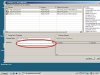
PPReconfigurator.jpg
 
Last edited:
We have already submitted bugreport regarding this issue (#117401 for your reference). Root cause is following: Box 'Interface' is filled only with names of network interfaces, which have IP addresses that are not presented in the main window (i.e. Plesk does not have them in the database.) If server has no such IP addresses -- box is left empty.
So, try to create additional new IP address. I hope it will help.
 
Back
Top