• Debian 11 is approaching its end-of-life (vendor EOL date - August 31, 2026). Plesk Obsidian 18.0.80 will be the last release to support it.
    If you are running Plesk Obsidian on Debian 11, we recommend you upgrade those servers to Debian 12 using our dist-upgrade tool.
  • We plan to deprecate and remove the support for XML RPC protocol versions earlier than 1.6.9.1 in Plesk Obsidian 18.0.82. We strongly recommend that you update all existing integrations using earlier versions of the XML RPC protocol to comply with the version 1.6.9.1 specification.

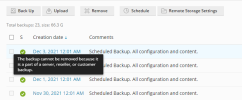
Issue The backup cannot be removed because it is a part of a server, reseller, or customer backup

ihsan

New Pleskian
Hello,
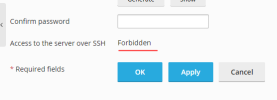
I cant seem to be able to delete plesk incremental backup. I want to try deleting the backup from SSH but access to it is forbidden. any solution?
 

Attachments

  • 1.png
    1.png
    27.1 KB · Views: 14
  • 2.PNG
    2.PNG
    9.7 KB · Views: 13
Hello,

The backups you are trying to delete are parts of high-level backups so they cannot be deleted independently.
To remove them you should locate 'main' backups.

As for SSH access, it looks like you do not have permission to manage it. This can be changed in your service plan. Please check https://support.plesk.com/hc/en-us/...ser-SSH-access-to-its-home-directory-in-Plesk to get more details about this setting.

P.S. If you were using Windows, you would see the 'Access to the server over Remote Desktop' option instead of the 'SSH Access'.
 
Hello,

The backups you are trying to delete are parts of high-level backups so they cannot be deleted independently.
To remove them you should locate 'main' backups.

As for SSH access, it looks like you do not have permission to manage it. This can be changed in your service plan. Please check https://support.plesk.com/hc/en-us/...ser-SSH-access-to-its-home-directory-in-Plesk to get more details about this setting.

P.S. If you were using Windows, you would see the 'Access to the server over Remote Desktop' option instead of the 'SSH Access'.
hello, thanks for replying.
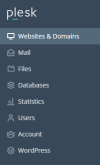
I would like to enable SSH but there is no 'service plan' option. Is there a higher level account that can manage this function?
 

Attachments

  • 1639628538199.png
    1639628538199.png
    13.3 KB · Views: 9
Back
Top