• The new Python extension is now available. It allows customers to deploy and manage WSGI-based Python applications on their websites directly from Plesk.
  • The Plesk Mobile apps for iOS and Android and the Plesk Mobile Center extension have been deprecated, and are no longer available for new installations. In Plesk Obsidian 18.0.84, the Plesk Mobile Center extension will be removed from servers during the upgrade, and the Plesk Mobile apps will lose their server management features.
  • The Social Login extension has been deprecated and will be removed in Plesk Obsidian 18.0.84. After that, it will no longer be possible to log in to Plesk with a Google, Facebook, GitHub account, or with a passkey. Plesk usernames and passwords, as well as logging in with a WebPros Account, are not affected.

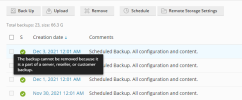
Issue The backup cannot be removed because it is a part of a server, reseller, or customer backup

ihsan

New Pleskian
Hello,
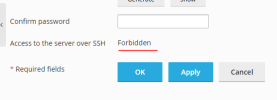
I cant seem to be able to delete plesk incremental backup. I want to try deleting the backup from SSH but access to it is forbidden. any solution?
 

Attachments

  • 1.png
    1.png
    27.1 KB · Views: 14
  • 2.PNG
    2.PNG
    9.7 KB · Views: 13
Hello,

The backups you are trying to delete are parts of high-level backups so they cannot be deleted independently.
To remove them you should locate 'main' backups.

As for SSH access, it looks like you do not have permission to manage it. This can be changed in your service plan. Please check https://support.plesk.com/hc/en-us/...ser-SSH-access-to-its-home-directory-in-Plesk to get more details about this setting.

P.S. If you were using Windows, you would see the 'Access to the server over Remote Desktop' option instead of the 'SSH Access'.
hello, thanks for replying.
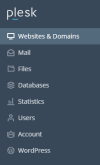
I would like to enable SSH but there is no 'service plan' option. Is there a higher level account that can manage this function?
 

Attachments

  • 1639628538199.png
    1639628538199.png
    13.3 KB · Views: 9
Back
Top