• The APS Catalog has been deprecated and removed from all Plesk Obsidian versions.
    Applications already installed from the APS Catalog will continue working. However, Plesk will no longer provide support for APS applications.
  • Please be aware: with the Plesk Obsidian 18.0.78 release, the support for the ngx_pagespeed.so module will be deprecated and removed from the sw-nginx package.

Question Webmail.mydomain.com IS NOT ACCESSIBLE

silver

Basic Pleskian
hello I can not access webmail with both of webmail.mydomain.com and also directly from my plesk web panel.

this is the problem :

webmail.something.mydomain.com
’s server IP address could not be found.

DNS_PROBE_FINISHED_NXDOMAIN

some notes :
my plesk is on a subdomain. it's DNS set to a subdomain and subdomain is working well ... DNS records also is present there , A record and MX record ...
 
Thanks , this will happen :


nslookup panel.mydomain.com
Server: 127.0.0.53
Address: 127.0.0.53#53

Non-authoritative answer:
Name: panel.mydomain.com
Address: myServerIpAddressShownHere

nslookup webmail.panel.mydomain.com
Server: 127.0.0.53
Address: 127.0.0.53#53

** server can't find webmail.panel.mydomain.com: NXDOMAIN
 
Last edited:
So, that means that there is no DNS record for webmail.panel.sarafinegar.com hostname. Check and fix it.
 
you mean I add MX record in panel.mydomain.com ?

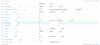
This pic is DNS settings for specified domain.
 

Attachments

  • Screenshot from 2019-01-29 14-57-44.png
    Screenshot from 2019-01-29 14-57-44.png
    84.4 KB · Views: 17
# dig A panel.s*****r.com +short
198.143.***.***
# dig A webmail.panel.s*****r.com +short
#

# whois s*****r.com | grep "Name Server:"
Name Server: NS1.Y****N.IR
Name Server: NS2.Y****N.IR

(DNS request to the real DNS Server that handles the Domain, gives no response to the webmail subdomain)
# dig A webmail.panel.s*****.com @ns1.y****n.ir +short
#

(DNS request to your Plesk Server)
# dig A webmail.panel.s*****r.com @198.143.***.***+short
198.143.***.***

You did the DNS on the Plesk Server, but the domain is managed externally so any DNS change over Plesk will not be applied.
Please add the record for webmail.panel.s*****r.com at your DNS Provider.
If you are not sure who the provider is you can do a lookup here: WHOIS Search | ICANN WHOIS

Best Regards,
 
Back
Top